Inner Land · 心地
EN: Play on the main site: https://inner-land.anewworlds.com . Use it for regular play, adding the game to your home screen and offline play after a successful load. The embed below has its own save, and its bridges may not reach the relay on some networks. To move a world to the main site, choose "⋯ → Save the world to a file", then "Restore from a file" on the main site; the bridges saved in the file come too. Guide: https://inner-land.anewworlds.com/guide .
ZH:正式站:https://inner-land.anewworlds.com 。长期游玩、加到主屏幕,以及成功载入后的离线游玩,都建议使用正式站。下面的内嵌版使用独立存档,桥在部分网络里可能连不上中继。要搬到正式站,先在「⋯ → 把世界存成一个文件」导出,再到正式站「从文件恢复」;文件里的桥也会一起过去。说明书:https://inner-land.anewworlds.com/guide 。
简介(EN)
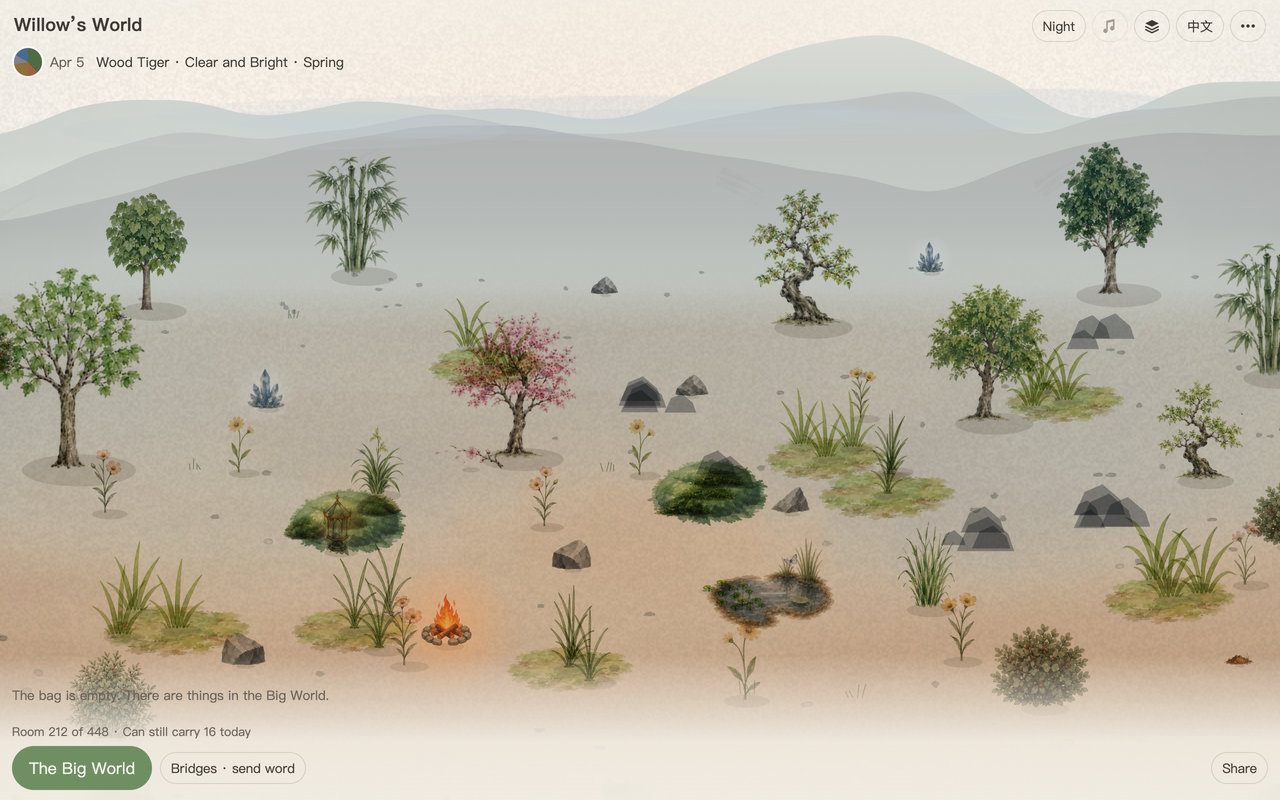
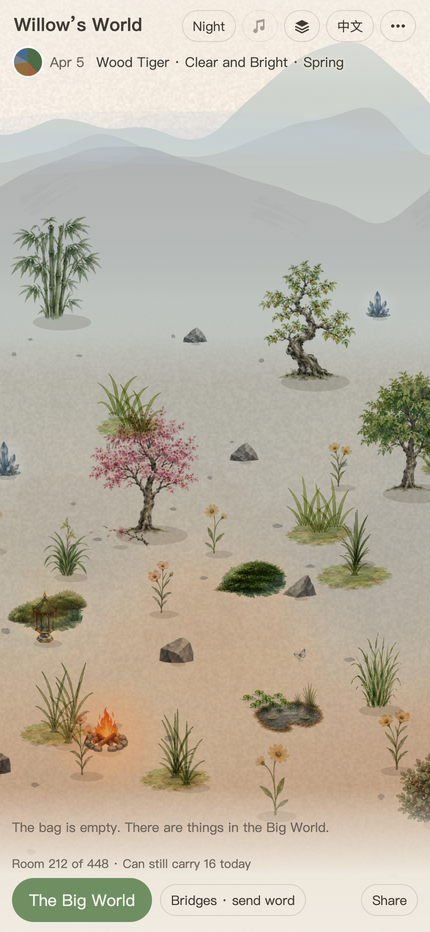
Inner Land is a watercolor simulation that follows the real calendar: four seasons, twenty-four solar terms and one game day per real day. Choose a meaningful date to generate your world's initial landscape. Then collect things from the Big World and decide where to put them.
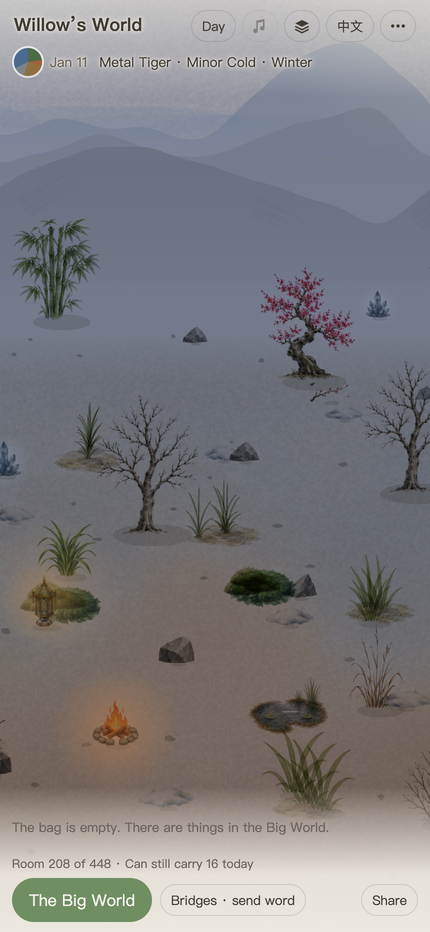
Plants grow, flower, shed leaves and age according to their kind, condition and surroundings. Fire warms nearby ground; water supplies moisture and moderates temperature. Water evaporates, clouds accumulate, and rain can replenish ponds or form new ones when the conditions fit. The game calculates the days you were away when you return.
Combine materials to make a Campfire, Lantern, Earthenware or Crystal Vase. Lanterns and Crystal Vases need one world day to set after crafting. Two Ponds close enough to each other can join automatically after three consecutive world days; Springs do not take part in that recipe.
Build a bridge with a friend by contributing materials from both worlds. Visit the copy of their world that reaches you, leave gifts, and repair the bridge when it becomes too weathered to cross. You can export your world and bridges to a file. A bridge friend who still holds your world's last shared copy can also help restore that copy and your bridge to them.
There are no accounts, payments or ads. Your world is saved in your browser on your device. You can play on a phone or desktop and switch between English and Chinese. The main site supports home-screen installation in compatible browsers and offline play after loading; bridges need a connection.
简介(ZH)
心地是一个跟随真实日历变化的水彩模拟世界:四季、二十四节气,现实一天,游戏里也过一天。选一个有意义的日期,生成世界的初始地形,再从大世界采集物件,决定把它们放在哪里。
植物会依照种类、自身状态和周围环境生长、开花、落叶、衰老。火让附近变暖,水提供湿度并缓和冷暖。水会蒸发,云会积累;条件合适时,雨可以补充池水,也可能积成新池。离开期间的变化,会在再次打开游戏时补算。
组合材料可以做出篝火、灯、陶器和水晶瓶。灯和水晶瓶合成后,要过一个世界日才成器。两口离得足够近的池连续三个世界日都这样,会自动汇成一口池;泉不参加这个配方。
和朋友各自提供材料,就能建桥。通过桥可以看对方传来的世界副本、送礼物;桥旧到无法通行时,需要补材料修复。自己的世界和桥可以导出成文件;如果桥友还保留着你最后传给他的世界副本,也能帮你恢复那一版世界和你们之间的桥。
不设账号、付费或广告。世界保存在你这台设备的浏览器里。手机和电脑都可以玩,支持中英文切换。正式站可以在兼容浏览器里加到主屏幕,成功载入后离线打开;桥上的往来需要联网。
How this world works · 说明书
Inner Land · How This World Works / 心地 · 这个世界的说明
English first, 中文在后(章节一一对应)。
English
1 Create a world
Choose a meaningful date, enter it and your name, and tap “Plant it” once. Choose an hour or “I don’t know”. The date and hour set the world's initial landscape, colours, base temperature and water capacity. After creation, it runs on today's real date. The About page shows one of sixty origin codes; that code stays fixed.
There is no goal you must complete. Collect things from the Big World, place them in your world, adjust their positions and observe how the environment and seasons affect them. You can also build bridges with friends to visit and exchange gifts.
The world saves itself in this browser on this device. No account is needed. In browsers that support it, the main site can be added to the home screen and opened offline after it has loaded successfully. Bridges and exchanges of news need a connection.
2 Collect, place and move things
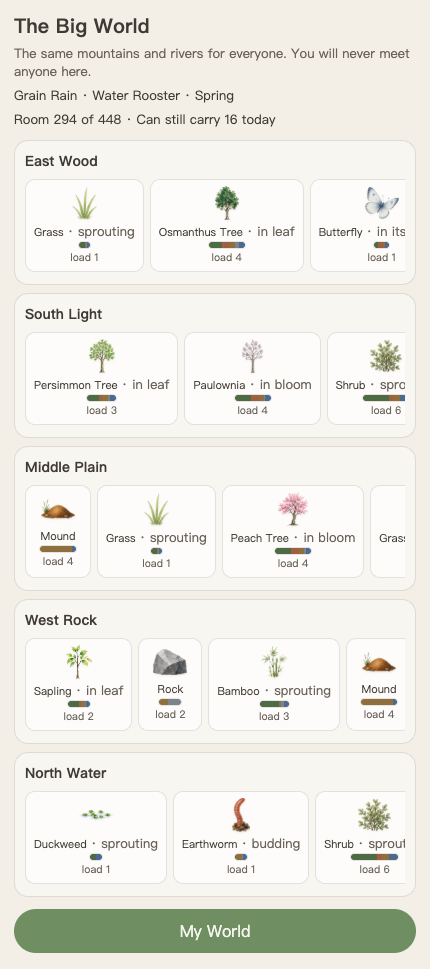
- Tap “The Big World” at the bottom. Swipe sideways through the cards in each of its five regions. Tap an available card to put that thing in your bag.
- Scroll down to “My World” at the bottom of the list and tap it to go home. What you took appears in the bag below the picture.
- Tap the thing in the bag, then a suitable spot in the picture to set it down. Drag the picture to look around.
- Tap something already on the ground to open its card. Choose “Move it”, then tap a new spot. “Return to the Big World” removes it from your world.
Things need the right ground: trees, stones and fire stand on dry ground; Lotus and Duckweed sit on water; Reed belongs by the shore. The page explains when the ground is unsuitable. If things on the same layer are too close, it tries a clear spot nearby. If none fits, the thing stays where it was, or in the bag.
Grass and Moss lie like carpets and do not block things above them. Footprints appear automatically while placing or moving something and disappear when you are done. A Pond or Spring uses its water surface as its boundary, without an extra ring.
3 Time, room and the daily carrying allowance
One game day is one real day. Seasons and the twenty-four solar terms follow the calendar. The date follows the calendar on your device, so each place turns to the next day at its own midnight; the two ends of a bridge in different time zones may be a day apart. Please don't change the device date to peek ahead. Set it forward and the world really lives through those days; setting it back does not undo them. The date stays at the day the world has reached, and nothing moves on until the real date catches up, including the daily amount you can carry back from the big world. Those days are yours to sit through; the world will not give them back. Closing the page does not pause the world: when you reopen it, the game calculates the changes during your absence and shows recent news. “Day / Night” at the top changes the scene's lighting; it does not advance the date.
The Big World refreshes daily. Everyone gets the same set of things on the same day; taking one does not take it away from anyone else. A spot you have taken from greys out for that day. The next day starts a fresh set, so the same kind need not be waiting in the same slot.
“Room” shows the amount still available: “Room 100 of 448” means the total capacity is 448 and 100 remains free. An item labelled “load 2” uses 2 of that room. “Can still carry today” is how much more can come home from the Big World that day. These values measure amount, not item count. Things on the ground, the bag, the soil's substance and water, clouds, and outgoing gifts not yet settled all take room. Both allowances must be sufficient to take something.
An item counts as carried when it enters your bag, not again when you place it. Returning it to the Big World frees room but does not refund that day's carrying. Living things grow and matter moves between water, cloud and soil, so room can change even when you have not pressed a button.
4 Growth, flowering and ageing
A plant's card names its stage today: sprouting, in leaf, in bloom, in fruit, shedding, dormant or evergreen. A winter-flowering tree may read “in bud” while it waits. These are not seven steps every plant must complete, and they are not a countdown of its remaining life.
Trees such as Peach, Plum, Paulownia and Persimmon first bank cold, then need suitable warmth during their flowering season. Osmanthus works the other way: it banks summer warmth and waits for autumn cooling. Water and the reserves that sustain it must also be sufficient. Different worlds and positions need not bloom together at the same solar term; a plant may miss a year. Its card may explain that winters are too mild or spring warms too late.
For a tree short of cold, try moving it away from a fire that burns continuously. For a tree with enough cold but too little spring warmth, try a warmer position. Move Osmanthus away from fire if it stays too warm in autumn. Water can supply moisture and moderate temperature, but neither watering nor moving guarantees flowers.
Bloom length depends on size and water: a strong plant generally lasts longer, a thin one less. A sapling must become a tree before flowering. Once a tree's flowers have finished, adding water does not restart that same round. A fruit-bearing tree needs enough time after its own bloom began, and enough remaining size, to enter its fruiting period. Reaching a date alone does not guarantee flowers or fruit.
Deciduous trees shed leaves in autumn and winter; trees still alive can leaf again in spring. Evergreen plants may stay evergreen through colder seasons when conditions are suitable. “Grown old” is separate from these seasonal stages: it means a plant has passed its size-increasing age. Evergreen plants age too. A change of stage or leaf colour does not reset age. Plants wither when their lives run out or sustained poor conditions exhaust them; their remains gradually decompose.
Fallen flowers, fruit and leaves remain on the ground and slowly come apart. Plants here have different lifespans; no amount of care keeps the same individual forever.
5 Water, rain and the local environment
How much groundwater this world can hold is set when it begins; how much it holds now changes daily. Plants drink, soil and water surfaces lose water, and part of what evaporates from soil, water and plants becomes cloud. Rain needs enough cloud, a suitable rain day and the rainy season from Grain in Ear to End of Heat. A cloud does not mean rain immediately. The clouds themselves are visible: the more there is, the greyer the sky. They are thickest in spring and clear around the summer solstice; they only fall as rain in the rainy season, so they gather through winter too. In the day or two before rain they draw together into clear shapes, heavier as the rain nears, and scatter once it has fallen.
Rain first wets dry soil, then replenishes exposed water surfaces. With enough left over and somewhere to gather, it can form a new pond. A Pond seeps and evaporates, and rain can fill it. It can still shrink when rain is scarce and losses are greater.
A Spring is groundwater surfacing, with a root; a Pond is surface water without that root. A Spring rises and falls with groundwater, going under in dry conditions and surfacing when there is enough water again. The Big World offers Ponds, not Springs. Two Springs do not automatically become a Pond.
Move a Pond or Spring and the Lotus and Duckweed floating on it move with it; Reed on the bank stays behind. Water cannot be placed over things that need dry ground or a shore.
Burning fire and lit lanterns pull nearby ground warmer; a fire or lantern that has dimmed still does about half of that, and one that has gone out does nothing. Ponds and Springs pull it towards their water temperature and moisture. The effect is stronger nearby and weaker further away. Water usually softens summer heat and winter cold; it does not make plants colder in every season. Light under a tree also differs from light in the open.
A lantern uses up fuel. Its estimate of days remaining assumes no refuelling and unchanged surroundings. Move burning fire beside a finished lantern and confirm “Feed it” or “Light it” to supply more. A lantern burns fire, not firewood: feeding it pours all the fire holds beyond its own embers into the lantern, and the fire settles back to embers.
6 Crafting, joining ponds and piling
Select a material in the bag, or tap an existing thing and choose “Move it”, then tap the other material — the spot must touch the footprint that material stands on. When the conditions fit, the page asks whether to combine. Materials are used and a new thing made only after you confirm. Either way round makes the same thing.
- Stone around Wildfire makes a Campfire.
- Crystal over a Campfire makes a Lantern.
- A Mound with enough fire makes Earthenware.
- Crystal set into Earthenware makes a Crystal Vase.
The materials need the right properties and sufficient amounts; any two neighbours do not make a recipe. Unused material may remain beside the result. A Lantern or Crystal Vase is “unfinished” on the day it is made, and sets after one world day. An unfinished lantern gives no light, and unfinished objects cannot be sent as gifts. A Crystal Vase is an object that does not emit light even when finished.
Put something onto a burning fire and the page asks whether to feed it in: plants, fallen leaves and wood make it burn higher, stone and the like burn down to ash that returns to the soil, and water damps it, enough of it puts it out. Only a fire that is burning and has strength to spare can feed a lantern, and a new lantern sets before it takes any. A dimmed lantern brightens again day by day with a fire burning beside it.
Two Ponds can join automatically into one Pond. Their centres must be close enough (measured between the two centres, not by whether the surfaces touch) for three consecutive world days. You can also move one Pond onto another so that the surfaces touch, and confirm “Pile together” when asked. Springs do not take part in automatic pond formation.
Two nonliving things of the same kind that touch are offered “Pile together” as well. The “Pile up” stack icon at the top gathers eligible nonliving things of the same kind and withered remains. It leaves living plants, water sources and crafted objects in place. The icon appears only when there is an eligible group to pile. Piling frees ground, not total room. A pile cannot be split again; gifts and bridge materials must take it whole.
7 Bridges and gifts
Open “Bridges · send word” at the bottom. One person chooses “Build a bridge”, selects materials and gives the code to their friend. The other chooses “Enter a code” and selects their own materials. Both must contribute, and the combined materials must contain all five colours; no particular proportions are required. The bridge completes after both devices exchange confirmation online. The materials used to build it are consumed.
A visit lets you look and leave gifts, not change the other person's world. What you see is their last received copy, advanced to today. A move they have just made becomes visible after their news arrives.
On each bridge you can send one gift per day, with at most three waiting to be taken. A gift still uses the sender's room until the recipient accepts it and that receipt reaches the sender. The recipient needs enough room to accept it; it enters their bag for them to place. Plants retain their age, growth and flowering records. Giving one away does not reset it to a new plant. A gift neither grows nor ages on the bridge or in a bag; it takes up its life where it lands, so a plant sent in bloom is still in bloom when taken. A gift nobody takes within a month comes back to your bag exactly as it left, and the bridge page says so.
On days nobody crosses, the bridge slowly weathers. A visit or gift from either side keeps that day from adding new wear; one crossing does not erase wear already accumulated. Once wear passes the halfway mark the bridge page offers “Add a little material”; either person can add some, and that clears the wear. There is no need to wait until it is impassable.
8 Save, move, or bring a world home
Normal play saves automatically. To export a backup, choose “⋯ → Save the world to a file”. It contains the whole world and the bridge keys; keep it yourself. Choose “⋯ → Restore from a file” to import it. Before creating a world, the restore option is inside “⋯” at the top of the planting page. After confirmation, the saved world replaces the world currently on that device.
Different addresses, browsers and devices keep separate worlds; they do not synchronise automatically. For regular play, use the main site at https://inner-land.pages.dev. Use it for home-screen and offline play too. The itch embed has a separate save, and its bridge relay may be unreachable on some networks.
To move from the embed to the main site, export a file and restore it at the main site. The bridges in the file come too. Once you have confirmed the restored world, you can choose “Start over” in the old embed and continue in the new place.
Without a file, a bridge friend may still hold a copy on their device. On the new device's planting page, open “⋯”, choose “My world is with a bridge friend — bring it home” and give the code to that friend. They choose “Send their world home” on your bridge. This restores the last version they hold and calculates elapsed changes up to today. It cannot recover actions that never reached them.
A file restores all the bridges saved in that file. Recovery through one friend restores your world and that one bridge; other bridges need to be built again. That bridge now connects to the new device, and the old location is no longer its endpoint.
9 Read the changes and find the controls
Tap a thing to see its stage, load and the solar term it arrived in. Sometimes its card adds a note about cold, heat, crowding or why it cannot bloom there. No extra note does not mean every growing condition is perfect.
The coloured circle at the top shows the world's current five-element balance. Ground matter, objects on the ground, groundwater, cloud and a fixed base tone all count; what sits in the bag does not, and the season affects the display. It changes with the world; it is not a task progress bar.
The bottom row has “The Big World”, “Bridges · send word” and “Share”. Along the top: Day / Night, insect sound (a note icon; tap to turn it on or off, off by default), Pile up (it appears only when there is something to pile), the language switch and “⋯”. “⋯” holds About this world, file saving and restoring, and Start over; renaming lives on the About page. While you are placing or moving something, the ground shows the patch each thing stands on, and it fades once you are done. A shared snapshot is a square picture: the whole world laid out, without buttons or numbers, the world's name and origin code in a corner. Tick the box and it also carries a line of the day's season and a few lines of recent news. It holds the world and the light of the moment you tap. Where the system offers sharing it shares; otherwise it saves as a picture. It is not a world save you can restore.
This guide is at “⋯ → About this world → How this world works”. Use “Back to the world” at the top of the guide to return.
10 Statement
- Art includes AI-generated assets: GPT image watercolour sprites and brush stamps. Landscape, motion and values are generated by code. The code was made with AI collaboration.
- The game has no accounts, payments or advertising. Worlds are stored locally; you initiate sharing, and bridge exchanges pass encrypted content through a relay.
中文
一 建立世界
选一个有意义的日子,填上年月日和名字,点一下「种下」。时辰可以选,也可以选「不记得」。这个日期和时辰决定世界的初始地形、底色、基础冷暖和蓄水能力;之后按现实中今天的日期运行。关于页里的「起笔暗号」有六十种,建立世界后不再改变。
游戏没有通关目标。主要玩法是从大世界采集物件,放进自己的世界,调整位置,观察它们随环境和季节发生的变化。也可以和朋友建桥,互相串门、送礼物。
世界自动保存在这台设备的这个浏览器里。不需要账号。正式站可以在支持的浏览器里加到主屏幕,成功载入后也能离线打开;建桥和传递近况需要联网。
二 采集、放置和移动
- 点底部「大世界」。五个区域里,卡片可以左右滑动;点一张能拿的卡,它就进了背包。
- 往下找到列表底部的「我的世界」,点它回家。刚拿的东西会出现在画面下方的背包里。
- 点背包里的东西,再点画面上一块合适的地,就把它放下。拖动画面可以看看别处。
- 点已经放下的东西,会打开详情卡。点「挪一挪」,再点新位置;点「放回大世界」,它就离开你的世界。
每样东西对落脚处有自己的要求:树、石、火要站在干地上,荷和浮萍要在水上,芦苇要靠岸。地方不合适,页面会说明原因。同层的东西太挤时,会尝试落在附近空处;附近也放不下,就留在原处或背包里。
草和苔像地毯,不挡上面的东西。放东西和挪东西时会自动显示占位,放完自动收起;池和泉以水面为界,不另画圈。
三 时间、承载和每日采集量
游戏中的一天对应现实中的一天,四季和二十四节气跟着真实日历走。日子跟着设备上的公历日期走,各地在自己的午夜翻页;桥的两头隔着时区时,可能一头已经是明天。请不要为了提前看结果而手动改设备的日期。往前拨,世界会真的走过那些天;拨回来也不会撤销,日子会停在世界已经走到的那一天,等真实日期追上来才继续,这期间大世界的每日带回量也不刷新。这一段日子是自己拨出来的,世界不会替你补回来。关闭页面不会暂停世界;再次打开时,会补算离开期间的变化,并显示近况。右上角的「昼/夜」只切换画面光线,不会进入下一天。
大世界每天刷新,同一天大家得到的是同一批山河之物;你拿走一处,不会把别人的那一处拿空。自己拿过的卡当天变灰,写着「今天拿过了」。新的一天重新算,不保证原位置还长着同一种东西。
页面上的「承载 剩余」表示还能容纳多少份量。例如「剩余 100 / 448」表示总容量是 448,目前还能放 100;物件卡上的「承载 2」则表示这件物件占用 2。「今天还能带」是当天还能从大世界带回的份量。这些数字都不是件数。地上的东西、背包、地里的底子与水、天上的云,还有送出未结清的礼物,都计入承载。拿东西时,这两项都要够。
东西进背包时就记了当天的带回量,放下不会再扣一次。放回大世界能腾出承载,但当天已经用掉的带回量不退。长着的东西会变大,水和残余也会流转,所以承载不只在你点按钮时变化。
四 植物怎样生长、开花和衰老
植物卡上的词说的是它今天的阶段:萌发、展叶、开花、挂果、辞叶、休眠、常青;冬天开花的树,在等花时也会读「含苞」。这些词不是每株都必须走完的一圈,也不是寿命的倒计时。
桃、梅、桐、柿等树,需要先经历足够的低温,再在各自的开花时段遇到合适的回暖。桂相反,需要积累夏天的暖,再等秋天降温。水分和自身活力也要够。同一节气、不同世界或位置,不一定同一天开,也可能这一年不开。点开卡片,有时能看到「冬天不够冷,春天开不了花。」或「这儿春天回暖太晚,赶不上开花。」这样的说明。
遇到缺冷的提示,可以尝试远离长期燃烧的火;已经积够冷、却回暖太晚的树,可以尝试暖一些的位置。桂到了秋天还嫌热,可以挪远一点离开火源。水边能供水,也会缓和冷暖,但补水或移动都不保证一定开花。
花开多久跟身量和水分有关:壮实的通常开得久,瘦小的短;树苗先长成树,再谈开花。花谢了,不会因为补了水就在同一轮重新开一遍。有果期的树,要从本株起花那天往后走够日子,并保有足够身量,才进入果期。节气到了,并不单独保证有花有果。
落叶树秋冬落叶,仍活着的树可以在春天重新长叶。常绿植物在条件合适时,秋冬也可以显示「常青」。「老了」和这些季节阶段是两回事:它表示这株植物已经超过继续增大的年龄。常青植物也会衰老;阶段或叶色改变不会重置年龄。寿命耗尽或长期环境不适会使植物枯萎,残余逐渐分解。
落下的花、果和叶会留在地上,逐渐分解。植物各有寿命,没有一种照料能让同一株永久存活。
五 水、雨和周围环境
世界能存多少地下水,在建立时确定;实际存着多少,每天都会变。植物耗水,地面和水面会失水,地面、水面的蒸发和植物的蒸腾,各有一部分成为云。下雨需要云量足够,并处于芒种到处暑的雨季,且当天符合降雨条件。仅有云不一定下雨。天上的云看得见:越厚越阴,春天最厚,夏至前后放晴;云只在雨季落,冬天也攒着。要下雨的前一两天,云会聚成明显的形状,离雨越近越浓;雨落完就散。
雨会先润干土,再给露着的水面补水,有余量和地方时还会积成新池。因此池会渗、会蒸发,也会被雨补起来;雨少、蒸发和消耗多的时候,池仍会缩小。
泉是地下水的露头,有根;池是一份没有根的地表水。 泉随地下水涨落,干时可以潜伏,地下水够了再露头。大世界可以拿到池,拿不到泉。两口泉不会自动汇成池。
移动池或泉时,浮在这片水上的荷、浮萍会跟着走,岸上的芦苇不跟着走。水也不能直接盖住需要站在干地或岸上的东西。
燃着的火和亮着的灯会提高附近的温度,暗下去的火和灯还有一半的作用,灭了的才没有;池和泉会让附近的温度、湿度更接近水体。作用随距离减弱。水边通常在夏天降温、冬天缓和寒冷,不是四季都降温。树下的光照也不同于空地。
灯会消耗燃料。卡片写「够烧约几天」,是按不添火、周围不变来估的。把燃着的火移到灯旁,确认「添火」或「点亮」,可以给已经成器的灯续上。灯不吃柴,只吃烧着的火:添一次火,就把火多出来的力气整个倒进灯里,火退成余烬。
六 合成、汇池和归堆
先选背包里的材料,或点已有的物件选择「挪一挪」,再点另一件材料身上——落点要碰到它占的那一圈地。条件合适时,页面会问合不合;点「合成」才会消耗材料、做出东西。谁放到谁身上,成的都是同一样东西。
- 石围住野火,成为篝火。
- 矿晶罩住篝火,成为灯。
- 土丘遇上足够的火,成为陶器。
- 陶器嵌入矿晶,成为水晶瓶。
材料的性质和份量要够,靠近任意两件东西并不都会合成。做成后,未用完的材料可能留在旁边。灯和水晶瓶当天只是「坯」,要过一个世界日才成器;灯坯不亮,也不能把坯当礼物送走。水晶瓶本来就是不发光的器物。
东西放到烧着的火上,页面会问要不要投进去:草木、落叶和柴让火更旺,石头一类烧成灰归入土里,水泼上去火就弱,多了就灭。给灯添火的只有烧着、还有余力的火,灯坯先成器才接得住;暗下去的灯旁边有火烧着,会一天天自己亮回来。
自动汇成一口池的是两口池。 它们的位置要足够近(按两口池的中心算,不是看水面有没有碰到),并连续三个世界日都这样。也可以把一口池移到另一口池上,让水面碰上,在页面询问时确认「堆到一起」。泉不参加自动汇池。
两份同一种的死物碰上,也会问要不要「堆到一起」。右上角的堆叠图标「堆一堆」会整理当前能归堆的同类死物和枯落残余,活植物不在其中,也不会替你移动水源或造好的器物。只有存在可归堆的组合时,这个图标才出现。归堆腾的是地,不减少总承载;堆成后不能拆开,送礼或建桥也只能拿整堆。
七 桥与礼物
从底部「桥 · 带上近况」进去,一方点「建一座桥」,选出材料,把生成的口令交给朋友;另一方点「输入口令」,再选自己的材料。两个人都要提供材料,合起来五色齐全即可,不要求比例。双方设备联网完成确认后,桥才建成;用于建桥的材料会消耗掉。
串门可以看、可以留礼物,不能改对方的世界。你看到的是最近收到的世界副本继续走到今天的样子;对方刚刚挪过的东西,要等近况传过来才看得到。
每座桥每天可以送一份礼物,最多三份等待对方领取。对方收下、且收下的回执传回来之前,礼物仍占送出方的承载。领取时,对方也要有足够承载;礼物先进入背包,再由对方放下。植物保留已有的年龄、生长和开花记录,送礼不会把它重置为新株。礼物在桥上、在背包里都不长不老,落地才接着长:开着花送出,对方收下时还开着。一个月没人领,就原样回你的背包,桥页会说一句。
没有人串门或送礼的日子,桥会累积风霜;任一方串门或留礼物,那一天就不再增加风霜。串门不会清除已经累积的风霜。风霜积到一半以上,桥页就会出现「补一点材料」;任一方补一点,风霜就清零,不必等到不能通行。
八 保存、搬家与渡回
日常操作会自动保存。要导出备份,点「⋯ → 把世界存成一个文件」。文件包含整个世界和桥的钥匙,自己保管。恢复时,点「⋯ → 从文件恢复」并选择文件;还没建立世界时,恢复入口在种下页右上角的「⋯」里。确认后,文件中的世界会替换当前这台设备上的世界。
不同网址、浏览器或设备,各自保存自己的世界,不会自动同步。长期游玩建议使用正式站 https://inner-land.pages.dev;加到主屏幕和离线打开也从正式站开始。itch 页面内嵌版使用独立存档,且桥在部分网络里可能连不上中继。
从内嵌版搬到正式站,先导出文件,再去正式站恢复。文件里的桥也会一起过去。确认恢复好后,原来的内嵌版可以「重新开始」,以后在新位置继续玩。
没有文件、但桥友设备上还保留着你的世界副本时,也可以从桥友那里恢复:在新设备种下页的「⋯」里选「我的世界在桥友那里——从桥友那里回家」,把回家口令交给桥友;对方在那座桥上点「送 TA 的世界回家」。恢复的是对方最后保存的版本,游戏会补算从那天到今天的时间变化,但不会补回从未传过去的操作。
文件恢复会恢复文件里保存的所有桥;从一位桥友那里恢复,只带回世界和那一座桥,其他桥需要重搭。经桥友恢复后,那座桥会连接新设备,旧位置不再是这座桥的连接端。
九 看懂变化与常用入口
点一件东西,先看它今天的词、承载和来到的节气。有时卡上还会说太冷、太热、周围挤压,或为什么赶不上花期;没有附加一句,不等于所有生长条件都完全合适。
页头的彩色圆表示世界当前的五行分布:地里的物质、地上的物件、地下水、云,还有一份不变的底色都会计入,背包里的东西不算,季节也会影响显示。它会随着世界变化,不是任务进度条。
底栏是「大世界」「桥 · 带上近况」和「分享」。右上角一排:昼/夜、虫声(一个音符,点一下开或关,默认关着)、堆一堆(有得堆的时候才出现)、中英文和「⋯」。「⋯」里是关于这个世界、存取文件和重新开始;改名字在关于页里。放东西和挪东西的时候,地上会画出各自占的那一圈地,放完自动收起。分享快照是一张方形的画:整个世界铺在画上,没有按钮和数字,角上是世界的名字和起笔暗号;勾上带近况才多一行天时和几句近况。画定在点下去那一刻的世界和昼夜;能分享就走系统分享,不能就存成图片。它不是可恢复的世界存档。
这份说明书在「⋯ → 关于这个世界 → 这个世界的说明书」。想回去,点说明书顶部的「回到世界」。
十 声明
- 美术含 AI 生成素材(GPT image:物件水彩精灵与笔触图章);地貌、动态与数值由程序生成。代码由 AI 协作完成。
- 游戏不设账号、付费或广告。世界保存在本机;分享由你发起,桥上的往来经中继传递加密内容。
Frequently asked questions(EN,同上节顺序)
- What should I do first? Tap “The Big World”, choose an available card in one of the five regions, then scroll down to “My World” to return. Tap the item in your bag, then the ground to place it. Tap a placed item to read its card or choose “Move it”.
- Why is a card grey? It says whether you already took it today, cannot carry more today, or have no room. Carrying and room measure amount, not item count. Returning things frees room but does not refund today's carrying.
- Why did the world change while the game was closed? It follows the real calendar and calculates the elapsed changes when reopened. “Day / Night” changes the picture's lighting, not the date.
- The solar term has arrived. Why is a tree not blooming? The date is only one condition. Peach, Plum, Paulownia and Persimmon need cold followed by warmth; Osmanthus needs summer warmth followed by autumn cooling. Water and vitality must also be sufficient. Read the card for a cold or temperature-timing message and try a different position. A plant need not bloom every year.
- Does fire help a tree flower? Not always. Fire can warm a tree that has already banked enough cold, but it can also prevent that cold from accumulating. Fire beside Osmanthus in autumn may delay cooling. Extinguished fires and unlit lanterns do not provide the same heat.
- Why did flowers last so briefly? Can water restart them? Flowering duration depends on size and water; thin trees usually bloom for less time. A sapling must first become a tree. Water does not restart a flowering round that has finished. A fruit-bearing tree also needs its own flowering record and enough remaining size to enter its fruiting period.
- Is a leafless winter tree dead? Does an evergreen live forever? No. Seasonal stage and age are separate. A living deciduous tree can leaf again in spring. Evergreens have lifespans too, and changing stage does not reset age. Read the stage and “grown old” separately.
- Why are there clouds without rain? The clouds are visible: the more there is, the greyer the sky. In the day or two before rain they draw together into clear shapes, heavier as the rain nears, and scatter once it has fallen. Rain needs enough cloud, a date in the rainy season from Grain in Ear to End of Heat, and a suitable rain day. Rain first wets dry soil, then exposed water surfaces; remaining water can form a new pond if space allows.
- Can a Pond grow? Do Springs automatically join into a Pond? A Pond seeps and evaporates, but rain can replenish it. Springs connect to groundwater and rise or fall with it. Two Springs do not automatically form a Pond. Automatic joining requires two Ponds to remain close enough and eligible for three consecutive world days. You can also move one Pond onto another and confirm “Pile together”. The Big World offers Ponds, not Springs.
- What happens to plants when I move water? Lotus and Duckweed floating on a Pond or Spring move with it. Reed stays on the bank. Water cannot cover things that require dry ground or a shore.
- Why did an item land somewhere other than where I tapped? Things on the same layer occupy space, and they need suitable ground. If the chosen space is occupied, the game tries nearby clear space; if none fits, the item stays at its old position or in the bag. Grass and Moss can lie beneath other things; Lotus and Duckweed occupy the water's floating layer.
- Why is my new Lantern dark? Will a Crystal Vase glow? A Lantern or Crystal Vase is unfinished on its crafting day and sets after one world day. Unfinished objects cannot be gifts. A finished Lantern also needs fuel; move fire to it and confirm “Light it” or “Feed it” to refuel. A Crystal Vase does not emit light, even when finished.
- What does “Pile up” do, and why is it sometimes missing? It gathers eligible nonliving things of the same kind and withered remains. It excludes living plants, water sources and crafted objects. The stack icon at the top appears only when an eligible group exists. Piling frees ground, not room; piles cannot be split and must be taken whole for gifts or bridges.
- Does visiting often mean a bridge never needs repair? A visit or gift prevents new wear for that day; it does not remove previous wear. Days without visits or gifts still add wear. Once wear passes the halfway mark, either person can add material, which clears the wear; there is no need to wait until it is impassable.
- Why does a sent gift still use my room? It waits on the bridge until accepted. It uses your room until the recipient accepts it and their receipt reaches you. They need enough room to take it. Each bridge allows one gift per day and at most three waiting gifts. Gifted plants retain their age and growth records.
- How do I move to another device or from itch to the main site? Export a world file at the old location, then restore it at the new one. It contains the saved world and all its bridges. Without a file, a friend who still holds your copy may help: open “⋯” on the planting page and choose to come home from a bridge friend. This restores the last copy they hold and only your bridge to them.
- Is a shared picture a backup? Why is there no sound? A snapshot is only a picture and cannot restore a world; use “Save the world to a file” for a backup. Insects are silent by default; tap the note icon at the top to turn them on, and again to turn them off.
常见问题(ZH)
- 刚进入游戏,先做什么? 点底部「大世界」,在五个区域的卡片中选一样能拿的东西。往下找到「我的世界」回家,再点背包中的物件、点地面放下。点已放下的物件可以查看详情或「挪一挪」。
- 为什么卡片灰了? 卡片会说明是今天拿过了、今天带不动了,还是世界承载不够。每日采集量和承载都按份量算,不是按件数。放回东西可以腾出承载,但不会退还当天的采集量。
- 为什么关掉游戏,回来已经变了? 时间跟着现实日历走。重新打开时,游戏会补算离开期间的变化;「日/夜」按钮只改画面光线,不推进日期。
- 到了节气,为什么树还没开花? 节气只是条件之一。桃、梅、桐、柿需要积冷和之后的回暖;桂需要夏天积暖、秋天降温。水分和自身活力也要够。点卡片看是否有缺冷、回暖太晚或秋天降温太晚的提示,再尝试调整位置;不是每株每年都一定开。
- 放在火边是不是更容易开花? 不一定。火能帮助已经积够冷的树回暖,也可能妨碍它先积冷;桂在秋天靠着火,也可能迟迟等不到降温。熄灭的火和未点亮的灯不提供同样的热作用。
- 花为什么开得短?补水能让它重新开吗? 花期受身量和水分影响,瘦小的树通常开得短。树苗要先长成树。同一轮花已经谢完,补水不会让它重开;有果期的树还要依据本株开花记录和剩余身量,才会进入果期。
- 冬天没叶子就是死了吗?常青就不会老吗? 都不是。落叶、休眠和年龄是不同状态,仍活着的落叶树可以在春天重新长叶。常青植物也有寿命,阶段变化不重置年龄。详情卡的阶段和「老了」需要分别看。
- 有云为什么不下雨? 天上的云看得见,越厚越阴。要下雨的前一两天,云会聚成明显的形状,离雨越近越浓;雨落完就散。下雨需要云量足够、日期处在芒种到处暑的雨季,并且当天符合降雨条件。雨先润干土,再补露着的水面,有余量和空间时可以积成新池。
- 池只会变小吗?泉会自动汇成池吗? 池会渗水、蒸发,也能得到雨水补充。泉和地下水相连,会随地下水涨落;两口泉不会自动汇成池。自动汇池需要两口池足够近,并连续三个世界日满足条件。也可以移动一口池到另一口池上,确认「堆到一起」。大世界能拿到池,不能拿到泉。
- 搬水后,水上的植物去哪了? 移动池或泉时,浮在它上面的荷和浮萍一起移动;岸上的芦苇留在原地。水不能直接盖住需要干地或岸边的物件。
- 为什么东西没落在我点的位置? 同层物件会占位,地面类型也要合适。发生挤占时,会尝试放到附近空处;附近也放不下,就保持原位置或留在背包。草和苔可以铺在其他物件下面,水面上的荷、浮萍属于另一层。
- 为什么合出的灯没有亮?水晶瓶会亮吗? 灯和水晶瓶刚做成时都是「坯」,过一个世界日才成器;坯不能送礼。灯成器后还需要燃料,燃料用完可以把火移过去,确认「点亮」或「添火」。水晶瓶成器后也不发光。
- 「堆一堆」有什么用,为什么有时看不到? 它会归拢可整理的同类非生物物件和枯落残余,不整理活植物、水源或已经做好的器物。右上角的堆叠图标只在有可归堆的组合时出现。归堆腾出地面,不减少承载;堆成后不能拆开,送礼或建桥要整堆拿走。
- 经常串门,桥就不用修了吗? 串门或送礼只让当天不再新增风霜,不能消掉以前积累的风霜。没有往来的日子仍会积累。风霜过半就能补材料,补了风霜就清零,不必等到不能通行。
- 送出的礼物为什么还占承载? 礼物在桥上等待领取;对方收下并且回执传回来之前,仍计入送出方承载。对方也要有足够承载才能领取。每座桥每天一份,最多三份待领。植物送过去仍保留原来的年龄和生长记录。
- 手机换了,或从 itch 搬到正式站,世界怎么带走? 先在旧位置导出世界文件,再在新位置恢复。文件包含保存时的世界和全部桥。没有文件时,如果桥友仍保留你的副本,可以在种下页「⋯」里选从桥友回家;这种恢复只带回他最后保存的世界和你们之间的那一座桥。
- 分享图片就是备份吗?为什么没有声音? 分享快照只是一张图,不能恢复存档;备份要用「把世界存成一个文件」。虫声默认关闭,点右上角的音符图标开启,再点关闭。
声明 / Statement
- 美术含 AI 生成素材(GPT image:物件水彩精灵与笔触图章);地貌、动态与数值由程序生成。代码由 AI 协作完成。
- 不设账号、付费或广告。世界保存在本机;分享由玩家发起,桥上的往来通过中继传递加密内容。
- Art includes AI-generated watercolour sprites and brush stamps made with GPT image. Landscape, motion and values are generated by code. The code was made with AI collaboration.
- There are no accounts, payments or ads. Worlds are stored locally; players initiate sharing, and bridges pass encrypted content through a relay.
Download
Click download now to get access to the following files:
Development log
Leave a comment
Log in with itch.io to leave a comment.